4 MIN READ

How a 3D menu changes the way people order

Most menus ask people to imagine the food. A 3D menu shows it: every dish turnable and zoomable on the guest's own phone, before anything is ordered.

We built one, watched twelve restaurants run it, and the pattern is consistent. When guests can see the plate, they stop guessing.
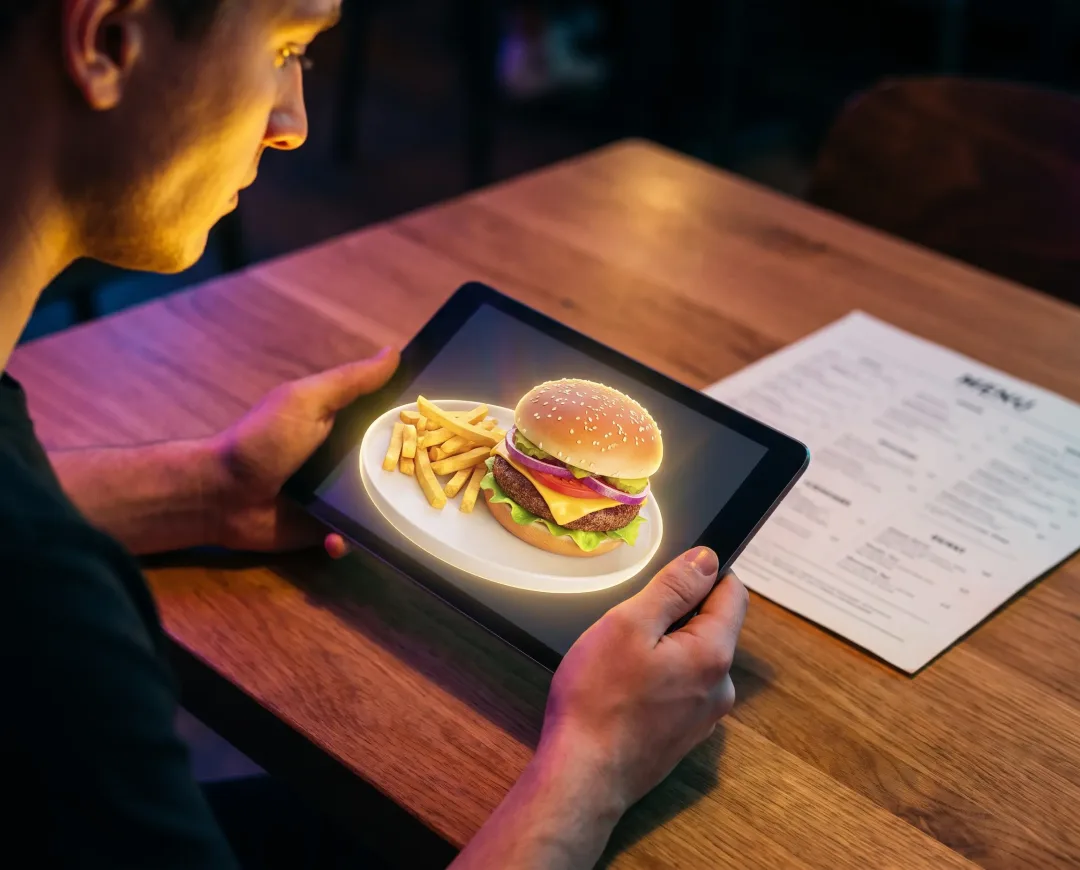
A guest at a restaurant table viewing a glowing 3D burger and fries on a tablet, next to a paper menu

In short

  • A 3D menu is a digital menu where guests scan a QR code at the table and inspect real dishes as 3D models in their phone's browser. No app to download.
  • Seeing the actual portion and presentation changes behaviour: guests ask fewer questions, order with more confidence, and try dishes they'd normally skip.
  • Across twelve venues, menus are now scanned about 40,000 times a month.

The most interesting change didn't happen at the table, though. It showed up in the kitchen, as one number every owner asks us about. We'll get to it.

What is a 3D menu?

A 3D menu is a digital restaurant menu where dishes are captured as photoreal 3D models that guests can rotate and zoom on their own phone, usually opened by scanning a QR code at the table. "Photoreal" means the model is built from photographs of the actual dish, so what spins on the screen is what arrives on the plate.

Nothing gets installed. The menu opens in the phone's browser, best-sellers appear as 3D models, and every other dish gets a photo, a description, and a price. That's the shape of 3D Menu, the system we run in restaurants today.

Why does seeing a dish change how people order?

People decide what to eat with their eyes first: research on "visual hunger" shows that just looking at appetising food images produces measurable physiological and neural responses. A printed menu gives that instinct nothing to work with but a name and a price.

That gap is where bad orders live. The guest gambles, the photo flatters, the portion surprises, and the plate goes back.

A model you can turn removes the gamble. Guests check the portion before committing, see the melted cheese up close, and order the braver thing because it stopped being a mystery.
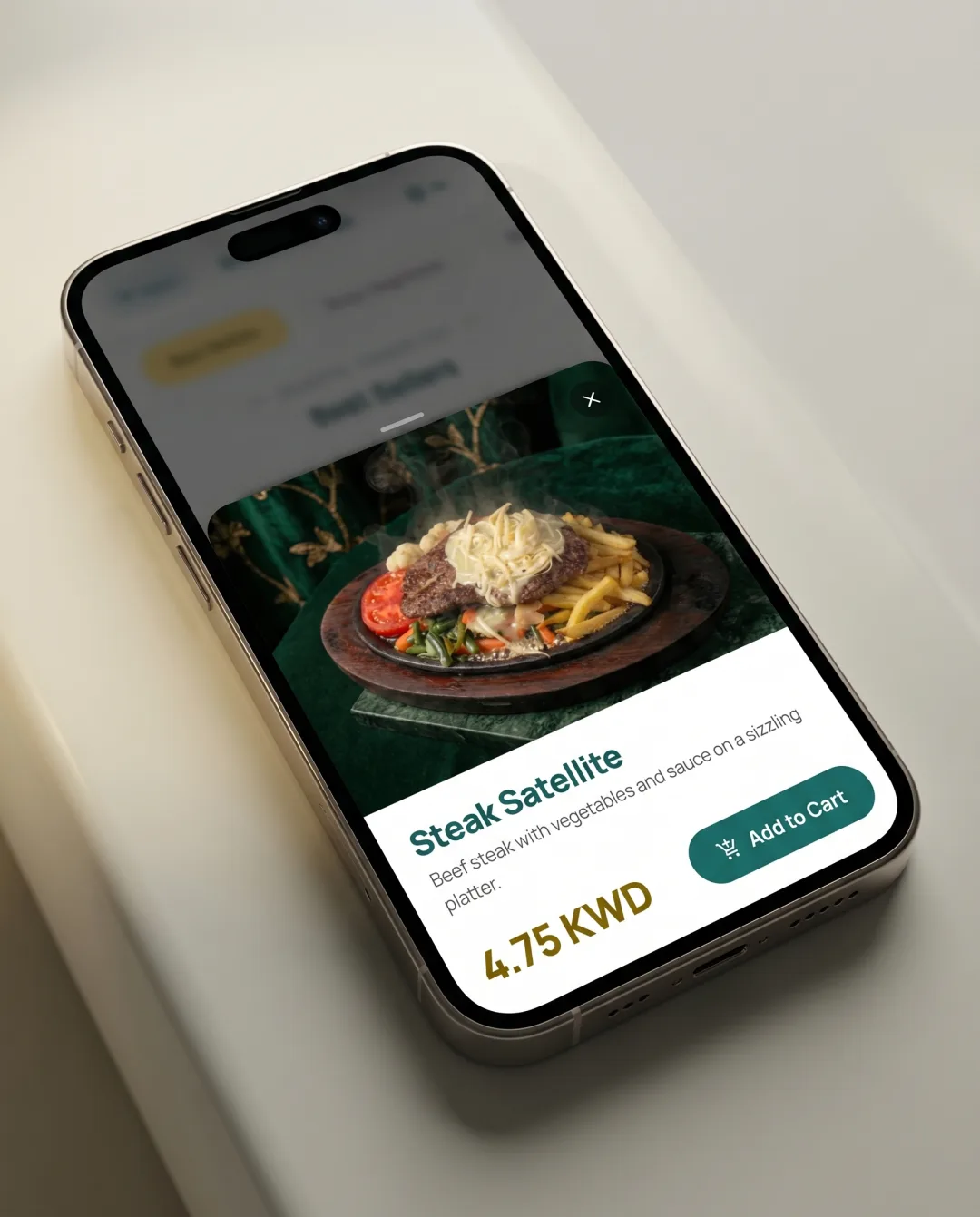
A dish detail page with an interactive 3D model, description and price
THE DISH PAGE: TURN IT, ZOOM IN, THEN ORDER IT

What happened when real restaurants tried it?

The first restaurant we built this for had a problem every owner will recognise: plates went back to the kitchen because nobody knew what they were ordering. He kept apologising to his guests.

Demo night told us everything. Guests didn't read the menu; they picked dishes up and turned them around. One customer spun the lamb shank twice and said "Oh, that's what it is." Questions to the waiters dropped that same evening, and orders got braver.

Across twelve venues, menus are now scanned about 40,000 times a month. The full story of the build, including the lazy susan we used as our first scanning rig, is in our studio journal.

What does a 3D menu change in the kitchen?

Here's the number we promised: mis-orders fell 31% within the first quarter. Fewer plates came back, and the ones that did were genuine kitchen errors, not misunderstandings.

A mis-order is expensive in every direction. The kitchen re-fires the dish, the table waits longer, and the original plate is usually waste.

The 3D view removes the "that's not what I expected" returns, and the ordering flow removes most of the rest: orders travel from the guest's phone to a live kitchen dashboard exactly as entered, organised by table. No misheard items, no lost tickets.
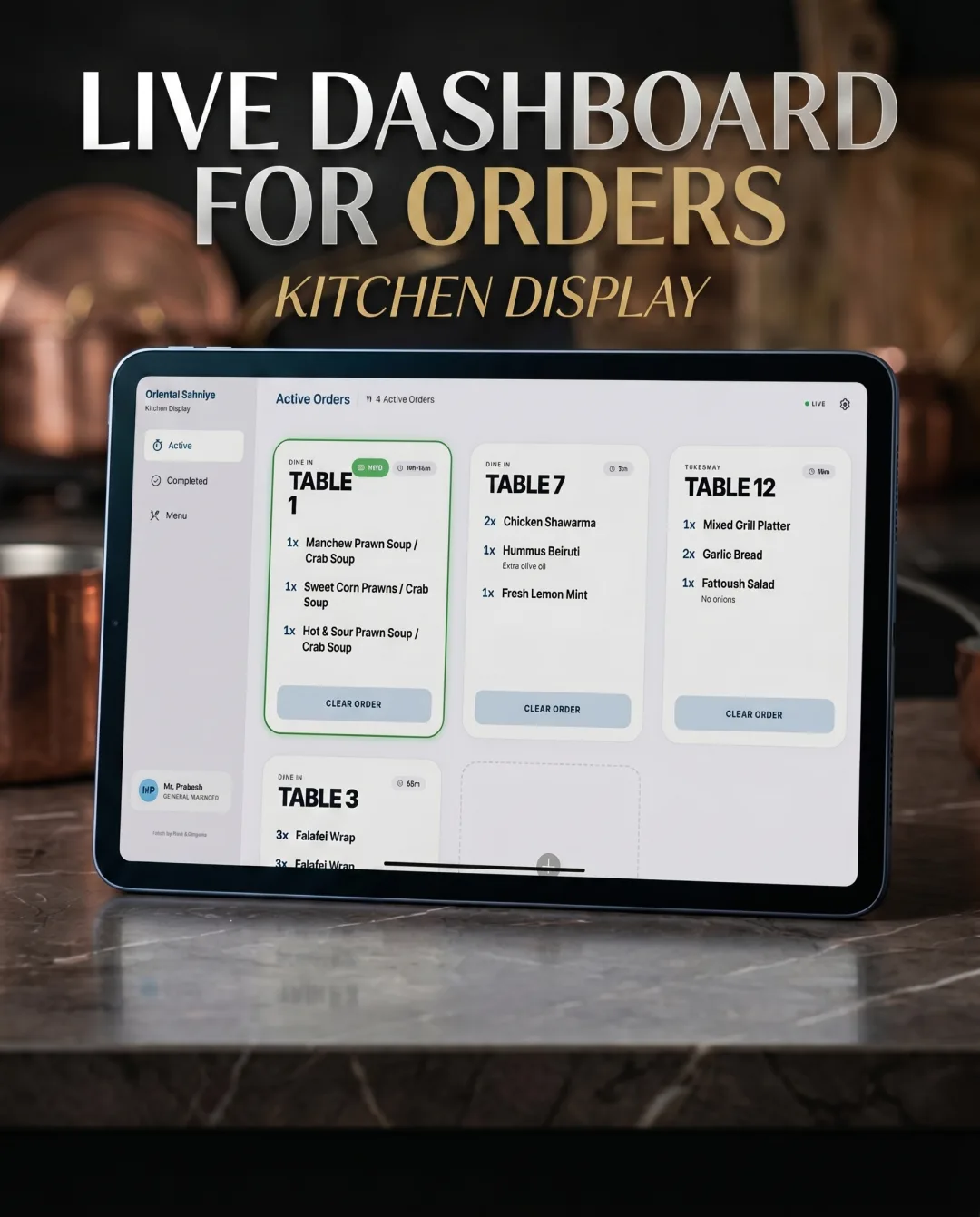
The kitchen dashboard showing live orders organised by table
THE KITCHEN SIDE: EVERY ORDER, BY TABLE, IN REAL TIME

What's the honest trade-off?

The trade-off is capture work: a dish has to be photographed from every angle before it can become a 3D model, and our first lamb shank took 214 photos.

That's why we don't put a whole menu in 3D. Best-sellers and signature dishes get models; the rest runs on photos and clear descriptions, which update on every table instantly. A kitchen that rewrites its entire menu weekly would keep the photo side current easily, the 3D side less so.

FAQ

Do guests need to download an app?

No. Guests scan the QR code at the table and the menu opens in their phone's browser. There's no app, no sign-up, and no account.

Does every dish need a 3D model?

No. Most restaurants put their best-sellers and signature dishes in 3D and present everything else with a photo, description, and price. Dishes and prices can be updated any time, and every table sees the change instantly.

How much does a 3D menu cost?

3D Menu is a one-time purchase with lifetime ownership. There's no monthly subscription and no setup fee; you buy it once and it's yours for as long as your restaurant is open.


If you want to see your own dishes this way, 3D Menu is the system we built for it: one QR code per table, a live kitchen dashboard, one purchase. Request a demo and we'll put your food in 3D before you decide.

More from Dusk

5 MIN READJUL 29

Bible app vs printed Bible: what changes

A Bible app and a printed Bible hold the same text in different objects. What changes in weight, search, text size and battery, and what does not.

4 MIN READJUL 29

How to find a verse when you forget the reference

You remember the words but not the chapter. How full-text search finds a verse from a fragment, which words to search for, and which ones waste your time.

4 MIN READJUL 29

Is there a free Urdu Bible app with no ads?

Yes. Urdu Bible is free, carries no advertising and asks for no account. Here is what free actually costs to run, and why we chose it anyway.

5 MIN READJUL 29

How to read the Bible in Urdu without the script

You can read the Bible in Urdu without knowing Nastaliq by using a Roman Urdu edition: the same Urdu words, spelled in the Latin letters you already read.

5 MIN READJUL 29

How to read the Bible at night without eye strain

Night mode gets the credit, but text size does most of the work. What actually reduces eye strain when reading scripture in bed, for tired and older eyes.

5 MIN READJUL 29

Why can't I read Urdu even though I speak it?

Speaking a language and reading it are learned in different places. Why fluent Urdu speakers never picked up the script, and why that is completely ordinary.

4 MIN READJUL 29

Transliteration vs translation: the difference

Transliteration changes the alphabet and keeps the words. Translation changes the words to carry the meaning. Why the difference matters for scripture.

5 MIN READJUL 29

Why Urdu Bible collects no data at all

Urdu Bible declares no data collected and no data shared on its store listing. What that declaration means, how to check it, and what it costs us.

4 MIN READJUL 29

Urdu Bible vs Zaboor: which one do you need?

Urdu Bible holds all 66 books of scripture. Zaboor holds Psalms, hymns and prayers to sing. What each app contains, and which one you actually want.

5 MIN READJUL 29

What is a reading Bible edition?

A reading Bible is defined by what it leaves out: no verse numbers, no cross-references, no notes. Here is why publishers strip them, and what it costs.

5 MIN READJUL 29

What is an offline Bible app?

An offline Bible app ships the whole text inside the install, so reading fetches nothing and records nothing. How to tell if one really works offline.

5 MIN READJUL 29

What is Nastaliq, and why is Urdu written in it?

Nastaliq is the sloping calligraphic script Urdu is set in. Where it came from, how its letters behave, and why it took until 1981 to print properly.

5 MIN READJUL 29

What is Roman Urdu, and who reads it?

Roman Urdu is the Urdu language written in the Latin alphabet. Where it came from, why its spelling is never fixed, and who reads it instead of the script.

5 MIN READJUL 29

What we left out of Urdu Bible, and why

No commentaries, maps, footnotes, streaks or reading plans. What we left out of Urdu Bible, and the line we drew about what a software studio should do.

5 MIN READJUL 29

Why Nastaliq text breaks in most apps

Urdu renders flat and wrong in most apps because no Nastaliq font is loaded, so the text falls back to naskh. This site had the bug too, and here is the fix.

5 MIN READJUL 29

Why we build for Urdu-speaking Christians first

Because it is the audience we belong to and can check our own work against. The practical case for starting with a small group, and how it goes wrong.

5 MIN READJUL 29

Why we built Urdu Bible, a Bible in two scripts

A grandparent reads Nastaliq and a grandchild reads only Latin letters. One book leaves one of them out, so we built an Urdu Bible that leaves neither.

5 MIN READJUL 27

Why we built Zaboor, a digital Urdu hymnal

We built Zaboor because a congregation loses the first verse of every hymn to a page hunt. Here's the story, the two decisions behind it, and what happened.

4 MIN READJUL 25

PDF menu vs 3D menu: which should your QR code open?

PDF menu vs 3D menu: both open from a QR code, but only one shows guests the dish. What changes for guests, for staff, and every time you edit a price.

4 MIN READJUL 14

3-day vs 6-day Push Pull Legs: which should you run?

3-day vs 6-day Push Pull Legs: the 6-day trains each muscle twice a week, which research favours, but only if you attend. Here's how to choose honestly.

4 MIN READJUL 14

How to keep a brag document for review season

How to keep a brag document for review season: one running note, a five-minute Friday habit, and your self-review assembles itself in an afternoon.

3 MIN READJUL 14

How to break a bench press plateau

Break a bench press plateau by checking the log first: most stalls are missed sessions or low volume. Then change one variable and hold it a month.

4 MIN READJUL 14

How to start tracking workouts in 5 minutes

Start tracking workouts in five minutes: log exercise, weight and reps for every work set, then beat one number next session. The whole setup is here.

3 MIN READJUL 14

Push Pull Legs vs Upper Lower: how to choose

Push Pull Legs vs Upper Lower: both build muscle, so choose by how many days you can really train. Here's the research and a ten-second decision rule.

4 MIN READJUL 14

How to start a wins journal in five minutes

Start a wins journal in five minutes: pick one place, write one line about one recent win, and stop. Here's the setup and the rule that keeps it alive.

4 MIN READJUL 14

What counts as a win worth writing down?

What counts as a win worth writing down? Anything that cost you something: effort, fear, or restraint. The size doesn't matter. Here's a simple test.

4 MIN READJUL 14

What is a brag document?

A brag document is a running record of your accomplishments at work, kept so review season doesn't depend on memory. Here's what goes in one and why.

4 MIN READJUL 14

What is a wins journal (and why keep one)?

A wins journal is a record of things that went right, kept so you can reread them later. Here's why it works, and what it does that memory can't.

4 MIN READJUL 14

What is progressive overload? A plain-English guide

Progressive overload means gradually asking your muscles to do more over time. Here's what it means in plain English and how to apply it in the gym.

4 MIN READJUL 14

What is the cookie jar method?

The cookie jar method is a mental technique: collect your past wins and deliberately revisit them when things get hard. Here's how to build yours.

4 MIN READJUL 14

What is training volume, and why do lifters track it?

Training volume is the total work you do in the gym, usually counted as hard sets per muscle each week. Here's why lifters track it and how to start.

4 MIN READJUL 14

Why we built Cookie Jar, a jar for your wins

We built Cookie Jar because every journal we tried demanded streaks and reflection, and we wanted somewhere to keep the good days. Here's the story.

3 MIN READJUL 14

Why you forget your wins (and how to fix it)

You forget your wins because the brain weighs bad events more than good ones, a bias research has measured. The fix: write them down, reread them.

4 MIN READJUL 14

Wins journal app vs notes app: an honest comparison

Wins journal app vs notes app: writing wins down works anywhere, but the point is getting them back on a bad day. Here's an honest comparison.

3 MIN READJUL 14

Wins journal vs gratitude journal: the difference

Wins journal vs gratitude journal: one records what you did, the other what you're thankful for. Here's the real difference and how to choose yours.

3 MIN READJUL 14

Workout app vs notes app: what actually matters

Workout app vs notes app for lifting: what matters is seeing last session's numbers while you train. Here's when notes work, and when they stop.